
Freebeat Alternatives: 6 Ways to Make Dance Videos (2026)
Freebeat turns music into rhythm-synced dance videos. If that is not quite your workflow, here are six alternatives — from reference-video motion transfer to template libraries — and when each one wins.
 Animaker Dev
Freebeat's core idea is music-first: give it a track and it produces a rhythm-synced dance video, ready for TikTok or Reels. It is a good fit when the song is the creative brief. But a lot of people arrive at Freebeat wanting something slightly different — a specific dance move copied exactly, a real person kept recognizable, or no subscription at all.
Here are six alternatives, organized by what they put first: the music, the template, or the motion.
Quick comparison
| Tool | What you provide | Motion source | Keeps the real person? | Pricing |
|---|---|---|---|---|
| Freebeat | A song | AI choreography, rhythm-synced | Stylized | Free tier + subscription |
| Animaker.dev | One photo + one reference video | Copied from your video | Yes | First video free, then per-video |
| Viggle | A photo + template | Template library | Replaces character | Free tier + subscription |
| Media.io | A photo + template | Template library | Face-led | Free tier + subscription |
| Kapwing | A photo + template | Template, in-editor | Face-led | Free plan (watermarked exports) |
| Kling AI | Prompt / photo | Generative | Partial | Credit packs |
1. Animaker.dev — when the move matters more than the song
The core difference: instead of generating choreography from a song, Animaker.dev copies the exact motion from a reference video you upload onto the person in your photo. If you saw a dance on TikTok and want that dance — not an AI approximation of "a dance" — this is the workflow.
Identity stays intact: face, hair, and clothing come from your photo. Pricing is per-video (first one free, no subscription, no watermark, automatic refunds when a render fails). The trade-off mirrors Freebeat's: you are not getting auto-choreography synced to a track, you are bringing the move yourself.
2. Viggle — the template-first original
Viggle remains the default for template-led full-body dance videos, with thousands of motions and a lively community. The output replaces your person with a stylized character, which is a feature for memes and a dealbreaker for "it has to be me".
3. Media.io — rhythm-adjacent templates with editing
Media.io's dance generator pairs a template library with a browser editor. It will not beat Freebeat at music sync, but if you want to tweak, trim, and caption the result without leaving the tab, the editor is the reason to pick it.
4. Kapwing — editor-first, dance second
Kapwing's AI dance maker is an editing suite with a dance generator bolted on. Free exports carry limits, and motion is template-tier. Pick it when the video is one step in a longer edit.
5. Kling AI — generative choreography
Kling can generate dance-style motion from prompts with strong physics. It is the closest to "AI choreographer", at the cost of identity preservation and credit burn during iteration.
6. Mango Animate — fast social variants
Mango Animate generates dance clips in multiple styles quickly, with a free tier. A reasonable Freebeat substitute when the goal is volume of social posts rather than a specific move.
Decision shortcut
- Specific move, real person → reference-video transfer (Animaker.dev)
- Song-first, stylized fine → stay with Freebeat
- Template browsing + community → Viggle
- Editing-first workflow → Kapwing
- Prompt-driven choreography → Kling
Related: Viggle AI dance alternatives and DomoAI alternatives for realistic motion. Full disclosure: Animaker.dev is our product. The comparison above includes the cases where Freebeat or another tool is the better pick — music-first workflows being the clearest one.
Continue reading
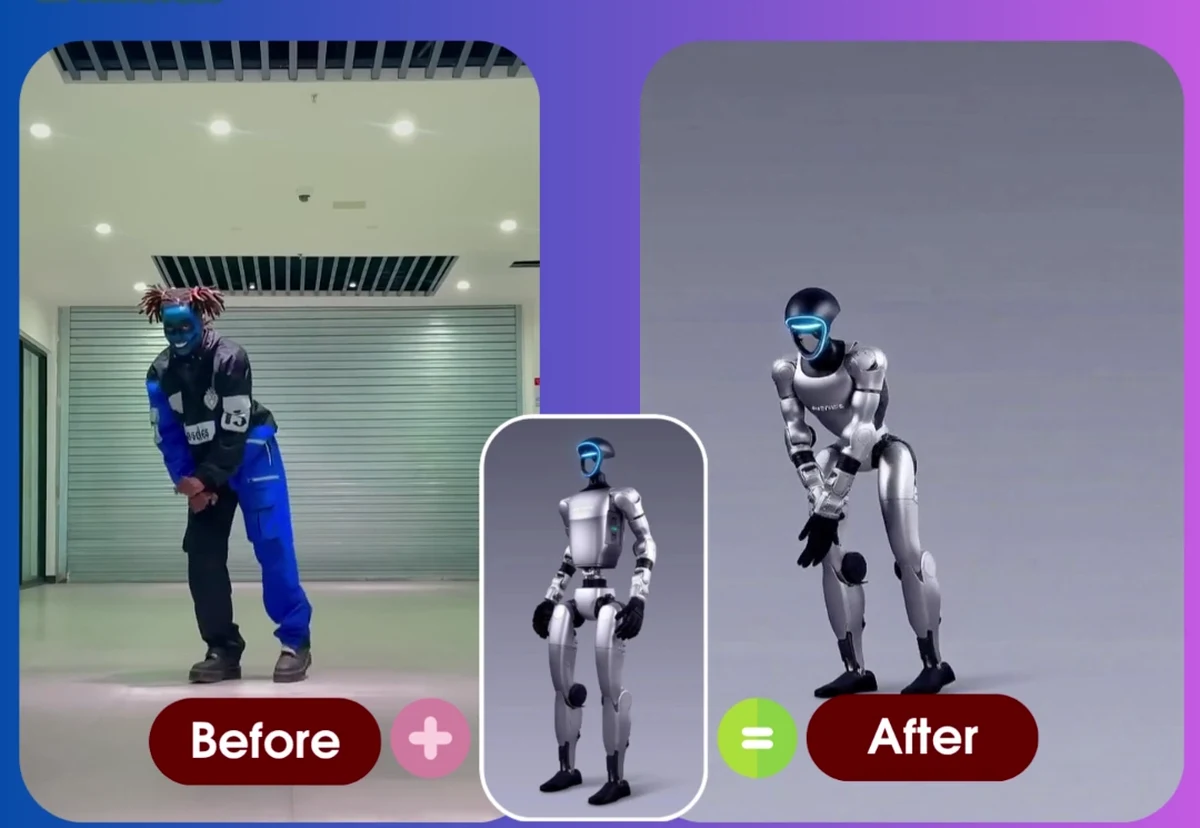
Motion Transfer vs Character Replacement vs Template Libraries: Three Ways to Animate a Photo
A plain-language comparison of the three approaches to animating a photo with AI — what each one keeps, what it needs from you, and how to choose between them.
Animaker Dev Team
DomoAI Alternatives for Realistic Motion (2026)
DomoAI is the Reddit favorite for stylized image-to-video. When you need photoreal motion that keeps the real person — dance, gesture, full-body movement — these four alternatives do it differently.
Animaker Dev
Viggle AI Dance: How It Works + 6 Best Alternatives (2026)
How Viggle AI Dance turns a photo into a dancing character — and six alternatives that keep the real person, with a free first video and no watermark.
Animaker Dev